<!DOCTYPE html>
	<html lang="vi" xmlns="http://www.w3.org/1999/xhtml" prefix="og: http://ogp.me/ns#">
	<head>
<title>HƯỚNG DẪN CÀI ĐẶT, SỬ DỤNG ỨNG DỤNG i-SPEED</title>
<meta name="description" content="HƯỚNG DẪN CÀI ĐẶT, SỬ DỤNG ỨNG DỤNG i-SPEED - Savefile - Tin Tức -...">
<meta name="author" content="TRUNG TÂM Y TẾ KHU VỰC TÂN LẠC">
<meta name="copyright" content="TRUNG TÂM Y TẾ KHU VỰC TÂN LẠC [hieusythb@gmail.com]">
<meta name="generator" content="NukeViet v4.4">
<meta name="viewport" content="width=device-width, initial-scale=1">
<meta http-equiv="Content-Type" content="text/html; charset=utf-8">
<meta property="og:title" content="HƯỚNG DẪN CÀI ĐẶT, SỬ DỤNG ỨNG DỤNG i-SPEED">
<meta property="og:type" content="website">
<meta property="og:description" content="Savefile - Tin Tức - https&#x3A;&#x002F;&#x002F;www.ttythuyentanlac.vn&#x002F;savefile&#x002F;tin-hoat-dong&#x002F;huong-dan-cai-dat-su-dung-ung-dung-i-speed-244.html">
<meta property="og:site_name" content="TRUNG TÂM Y TẾ KHU VỰC TÂN LẠC">
<meta property="og:url" content="https://ttythuyentanlac.vn/tin-hoat-dong/huong-dan-cai-dat-su-dung-ung-dung-i-speed-244.html">
<link rel="shortcut icon" href="https://www.ttythuyentanlac.vn/favicon.ico">
<link rel="canonical" href="https://ttythuyentanlac.vn/tin-hoat-dong/huong-dan-cai-dat-su-dung-ung-dung-i-speed-244.html">
<link rel="alternate" href="https://www.ttythuyentanlac.vn/rss/" title="Tin Tức" type="application/rss+xml">
<link rel="alternate" href="https://www.ttythuyentanlac.vn/rss/tin-hoat-dong/" title="Tin Tức - Tin hoạt động" type="application/rss+xml">
<link rel="alternate" href="https://www.ttythuyentanlac.vn/rss/cong-tac-dang-doan-the/" title="Tin Tức - Công tác Đảng Đoàn thể" type="application/rss+xml">
<link rel="alternate" href="https://www.ttythuyentanlac.vn/rss/khoa-phong-chuyen-mon/" title="Tin Tức - Khoa Phòng chuyên môn" type="application/rss+xml">
<link rel="alternate" href="https://www.ttythuyentanlac.vn/rss/phong-chong-dich-covid-19/" title="Tin Tức - Phòng chống Dịch COVID-19" type="application/rss+xml">
<link rel="alternate" href="https://www.ttythuyentanlac.vn/rss/chuong-trinh-muc-tieu/" title="Tin Tức - Chương trình mục tiêu" type="application/rss+xml">
<link rel="alternate" href="https://www.ttythuyentanlac.vn/rss/dich-vu-y-te/" title="Tin Tức - Dịch vụ Y tế" type="application/rss+xml">
<link rel="alternate" href="https://www.ttythuyentanlac.vn/rss/thong-tin-tuyen-dung/" title="Tin Tức - Thông tin tuyển dụng" type="application/rss+xml">
<link rel="alternate" href="https://www.ttythuyentanlac.vn/rss/cong-trinh-de-tai/" title="Tin Tức - Khám chữa bệnh" type="application/rss+xml">
<link rel="alternate" href="https://www.ttythuyentanlac.vn/rss/thong-tin-thong-ke/" title="Tin Tức - Thông tin Thống kê" type="application/rss+xml">
<link rel="alternate" href="https://www.ttythuyentanlac.vn/rss/cong-khai-tai-chinh/" title="Tin Tức - Công khai tài chính" type="application/rss+xml">
<link rel="alternate" href="https://www.ttythuyentanlac.vn/rss/lich-truc-chuyen-mon/" title="Tin Tức - Lịch trực chuyên môn" type="application/rss+xml">
<link rel="preload" as="script" href="https://www.ttythuyentanlac.vn/assets/js/jquery/jquery.min.js">
<link rel="preload" as="script" href="https://www.ttythuyentanlac.vn/assets/js/language/vi.js">
<link rel="preload" as="script" href="https://www.ttythuyentanlac.vn/assets/js/global.js">
<link rel="preload" as="script" href="https://www.ttythuyentanlac.vn/themes/default/js/news.js">
<link rel="preload" as="script" href="https://www.ttythuyentanlac.vn/assets/js/jquery/jquery.cookie.js">
<link rel="preload" as="script" href="https://www.ttythuyentanlac.vn/themes/egov/js/main.js">
<link rel="preload" as="script" href="https://www.ttythuyentanlac.vn/themes/egov/js/custom.js">
<link rel="preload" as="script" href="https://www.ttythuyentanlac.vn/themes/egov/js/bootstrap.min.js">
<link rel="StyleSheet" href="https://www.ttythuyentanlac.vn/assets/css/font-awesome.min.css">
<link rel="StyleSheet" href="https://www.ttythuyentanlac.vn/themes/egov/css/bootstrap.min.css">
<link rel="StyleSheet" href="https://www.ttythuyentanlac.vn/themes/egov/css/style.css">
<link rel="StyleSheet" href="https://www.ttythuyentanlac.vn/themes/egov/css/style.responsive.css">
<link rel="StyleSheet" href="https://www.ttythuyentanlac.vn/themes/egov/css/custom.css">
<link rel="StyleSheet" href="https://www.ttythuyentanlac.vn/themes/egov/css/news.css">
<style>
	body{background: #fff;}
</style>
	</head>
	<body>
<div id="print">
	<div id="hd_print">
		<h2 class="pull-left">TRUNG TÂM Y TẾ KHU VỰC TÂN LẠC</h2>
		<p class="pull-right"><a title="TRUNG TÂM Y TẾ KHU VỰC TÂN LẠC" href="https://www.ttythuyentanlac.vn/">https://www.ttythuyentanlac.vn</a></p>
	</div>
	<div class="clear"></div>
	<hr />
	<div id="content">
		<h1>HƯỚNG DẪN CÀI ĐẶT, SỬ DỤNG ỨNG DỤNG i-SPEED</h1>
		<ul class="list-inline">
			<li>Thứ hai - 17/06/2024 23:49</li>
			<li class="hidden-print txtrequired"><em class="fa fa-print">&nbsp;</em><a title="In ra" href="javascript:;" onclick="window.print()">In ra</a></li>
			<li class="hidden-print txtrequired"><em class="fa fa-power-off">&nbsp;</em><a title="Đóng cửa sổ này" href="javascript:;" onclick="window.close()">Đóng cửa sổ này</a></li>
		</ul>
		<div class="clear"></div>
		<div id="hometext">
		</div>
				<div class="imghome">
			<img alt="HƯỚNG DẪN CÀI ĐẶT, SỬ DỤNG ỨNG DỤNG i-SPEED" src="https://www.ttythuyentanlac.vn/uploads/news/2024_06/image-20240618104951-1.jpeg" width="600" class="img-thumbnail" />
		</div>
		<div class="clear"></div>
		<div id="bodytext" class="clearfix">
			<h3>HƯỚNG DẪN CÀI ĐẶT, SỬ DỤNG ỨNG DỤNG i-SPEED</h3>

<hr />
<p>Để sử dụng ứng dụng người dùng truy cập vào trình duyệt Inertnet trên máy tính để sử dụng trực tiếp hoặc tải ứng dụng i-Speed về điện thoại theo link bên dưới:</p>

<p><a href="https://speedtest.vn/" target="_blank" title="iSpeed">i-Speed trên nền tảng web</a></p>

<p><a href="https://apps.apple.com/us/app/i-speed-by-vnnic/id1558347187" target="_blank" title="iSpeed iOS">i-Speed dành cho iOS</a></p>

<p><a href="https://speedtest.vn/android-download" target="_blank" title="iSpeed Android">i-Speed dành cho Android</a></p>

<p>Hoặc có thể thực hiện theo một trong những cách sau:</p>

<p>1. Hướng dẫn cài đặt ứng dụng i-speed trên thiết bị di động</p>

<p>Ứng dụng i-Speed hiện đang được cung cấp miễn phí trên hai nền tảng kho ứng dụng của App Store&nbsp;(điện thoại dùng IOS)&nbsp;và CH Play&nbsp;(điện thoại dùng Android)&nbsp;với tên gọi là i-Speed by VNNIC.</p>

<p>Cách 1: &nbsp;Cài đặt từ mã QR code</p>

<p>Người dùng có thể sử dụng tính năng Quét mã QR từ Google Lens trong camera, &nbsp;quét mã QR từ Zalo, Google Chrome để quét mã QR code:</p>

<table>
	<tbody>
		<tr>
			<td valign="top">
			<p>Apple Store</p>
			</td>
			<td valign="top">
			<p>CH Play/Google Play Store</p>
			</td>
		</tr>
		<tr>
			<td valign="bottom">
			<p><img alt="" height="300" src="https://www.ttythuyentanlac.vn/uploads/news/2024_06/image-20240618104951-1.jpeg" width="300" /></p>
			</td>
			<td valign="top">
			<p><img alt="" height="551" src="https://www.ttythuyentanlac.vn/uploads/news/2024_06/image-20240618104951-2.jpeg" width="551" /></p>
			</td>
		</tr>
	</tbody>
</table>

<p>Cách 2: Cài đặt phần mềm i-Speed by VNNIC từ kho ứng dụng (Store)</p>

<table>
	<tbody>
		<tr>
			<td valign="top">
			<p>Apple Store</p>
			</td>
			<td valign="top">
			<p>CH Play/Google Play Store</p>
			</td>
		</tr>
		<tr>
			<td valign="top">
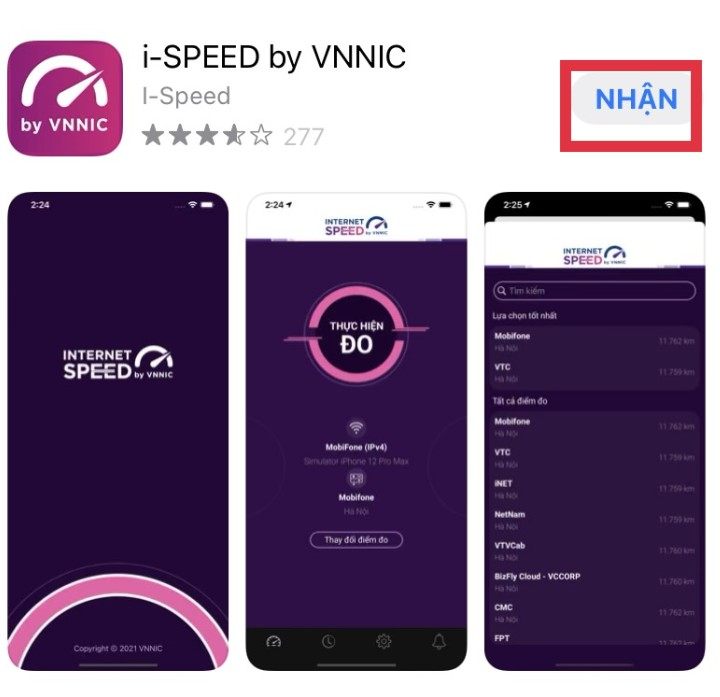
			<p>Truy nhập Apple Store</p>

			<p>Tìm ứng dụng i-Speed by VNNIC; hoặc ứng dụng speedtest vn; ispeed; i-peed</p>

			<p>Sau đó nhấn nút “NHẬN”</p>

			<p><img alt="" height="697" src="https://www.ttythuyentanlac.vn/uploads/news/2024_06/image-20240618104951-3.png" width="720" /></p>
			</td>
			<td valign="top">
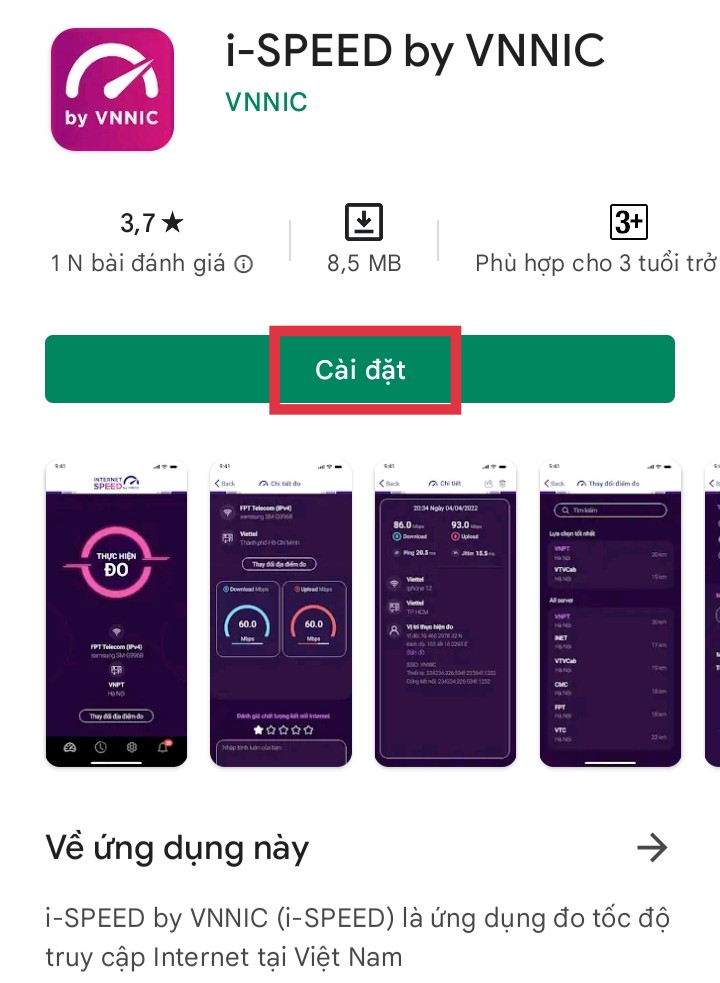
			<p>Truy nhập CH Play/Google PlayStore</p>

			<p>Tìm ứng dụng: i-Speed hoặc i-Speed by VNNIC</p>

			<p>Sau đó nhấn nút “Cài đặt”</p>

			<p><img alt="" height="983" src="https://www.ttythuyentanlac.vn/uploads/news/2024_06/image-20240618104951-4.png" width="720" /></p>
			</td>
		</tr>
	</tbody>
</table>

<p>2. Hướng dẫn sử dụng ứng dụng i-speed</p>

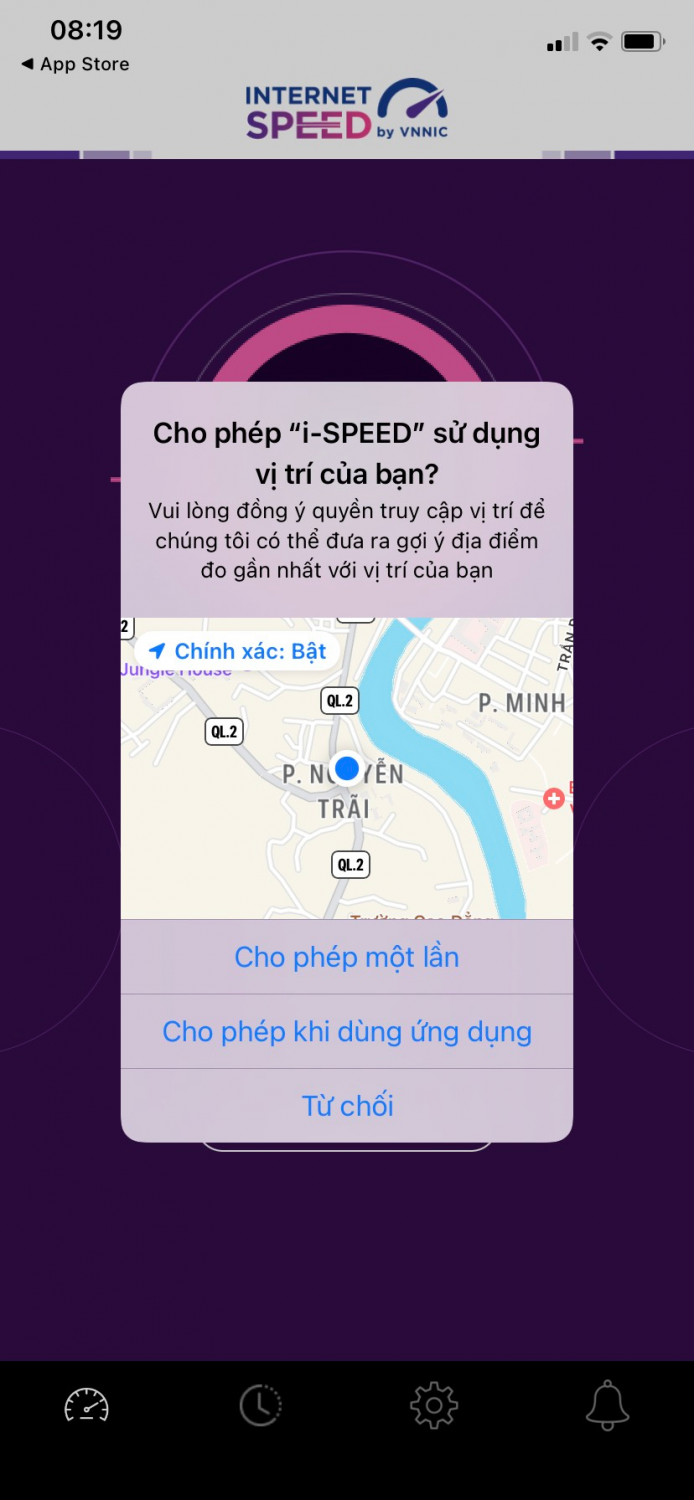
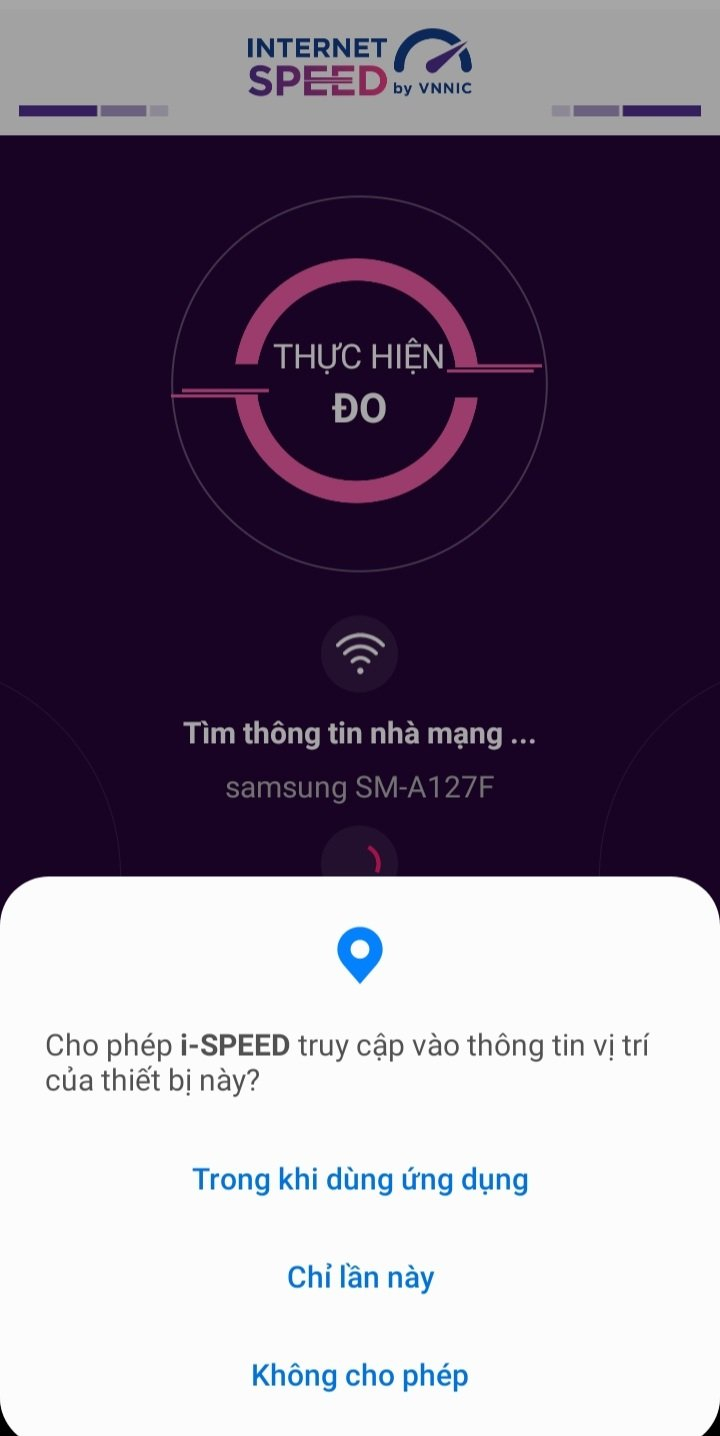
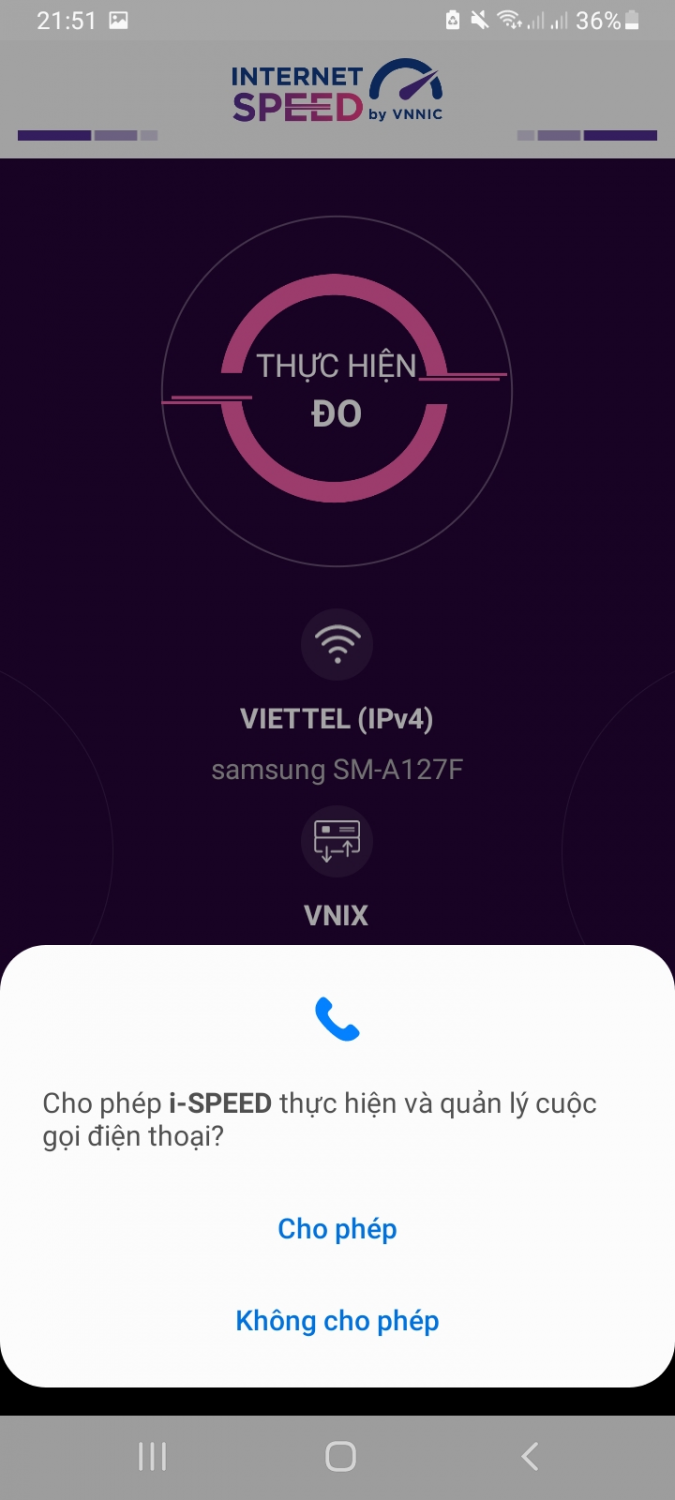
<p>Bước 1. Sau khi cài đặt ứng dụng người dùng truy cập vào ứng dụng và cho phép quyền truy cập vị trí của ứng dụng: Cho phép một lần; hoặc cho phép khi dùng ứng dụng.</p>

<p><img alt="" height="1792" src="https://www.ttythuyentanlac.vn/uploads/news/2024_06/image-20240618104951-5.png" width="828" />&nbsp;<img alt="" height="1436" src="https://www.ttythuyentanlac.vn/uploads/news/2024_06/image-20240618104952-6.png" width="720" /><img alt="" height="1600" src="https://www.ttythuyentanlac.vn/uploads/news/2024_06/image-20240618104952-7.png" width="720" /></p>

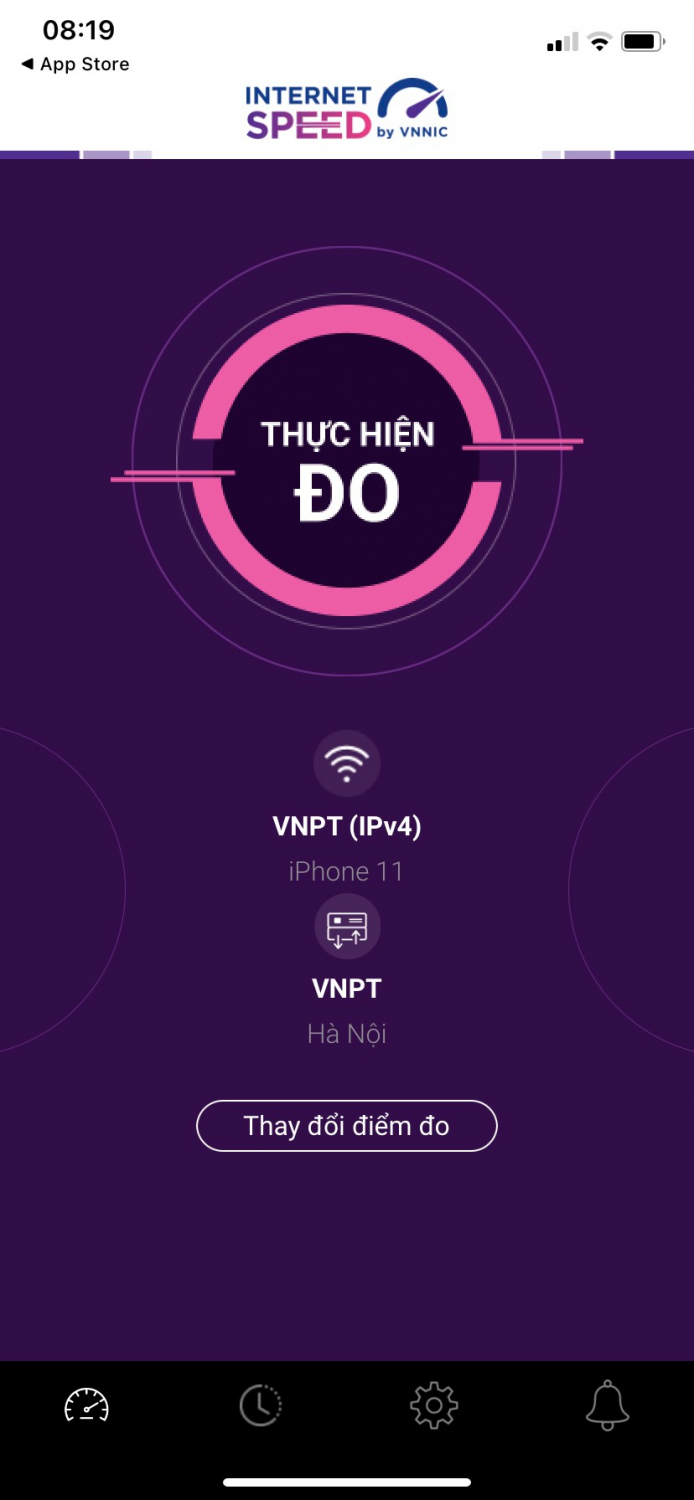
<p>Bước 2: Chọn “Thay đổi điểm đo”: Chọn server điểm đo của hệ thống; lựa chọn điểm đo gần với người dùng nhất để có kết quả đo chính xác nhất.</p>

<ul>
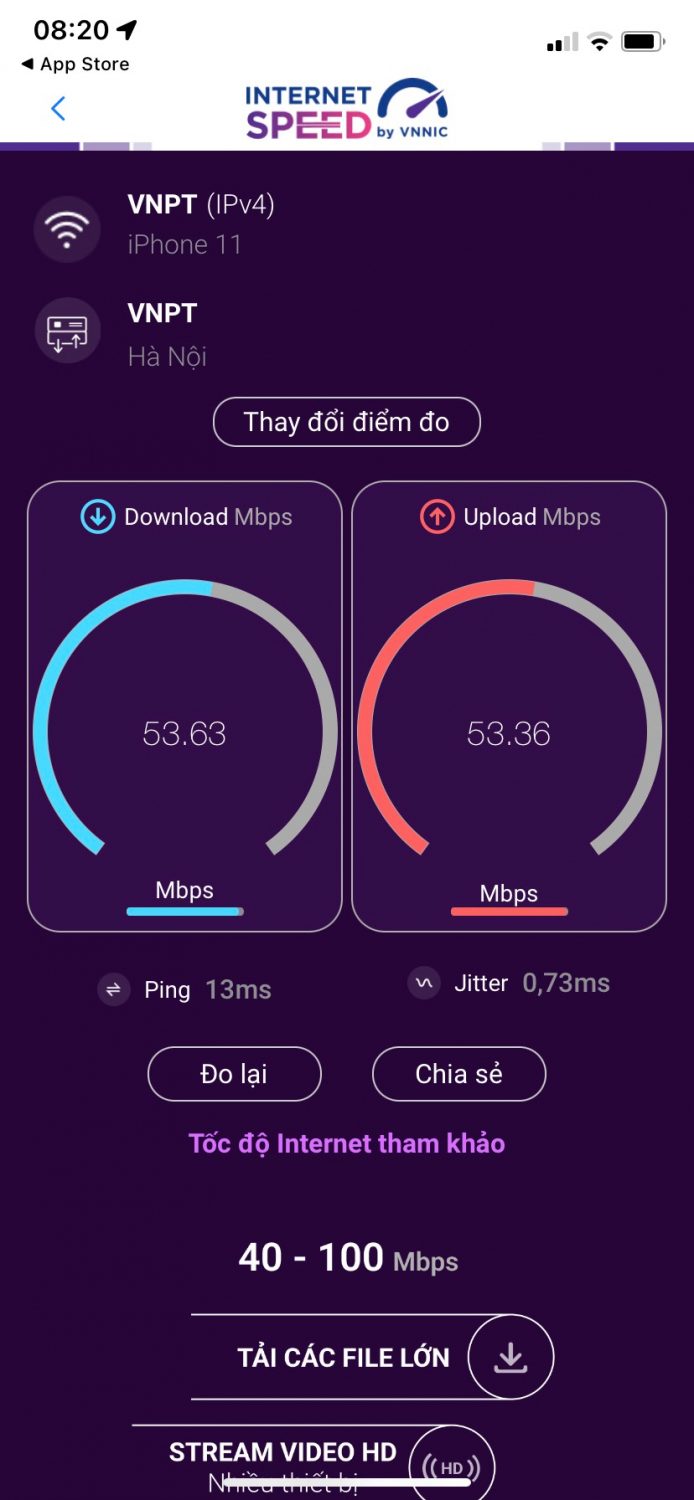
	<li>Chọn “Thực hiện đo” để bắt đầu. Quá trình đo sẽ được diễn ra ngay lập tức.&nbsp;Các thông số về chất lượng truy cập Internet bao gồm tốc độ tải xuống (Download), tốc độ tải lên (Upload), tham số thể hiện thời gian trễ truy cập (Ping) và tham số thể hiện chất lượng, mức độ ổn định của kết nối Internet (Jitter).&nbsp;<img alt="" height="1792" src="https://www.ttythuyentanlac.vn/uploads/news/2024_06/image-20240618104952-8.png" width="828" /><img alt="" height="1792" src="https://www.ttythuyentanlac.vn/uploads/news/2024_06/image-20240618104952-9.png" width="828" /><img alt="" height="1792" src="https://www.ttythuyentanlac.vn/uploads/news/2024_06/image-20240618104952-10.png" width="828" /></li>
</ul>

<p>&nbsp;</p>

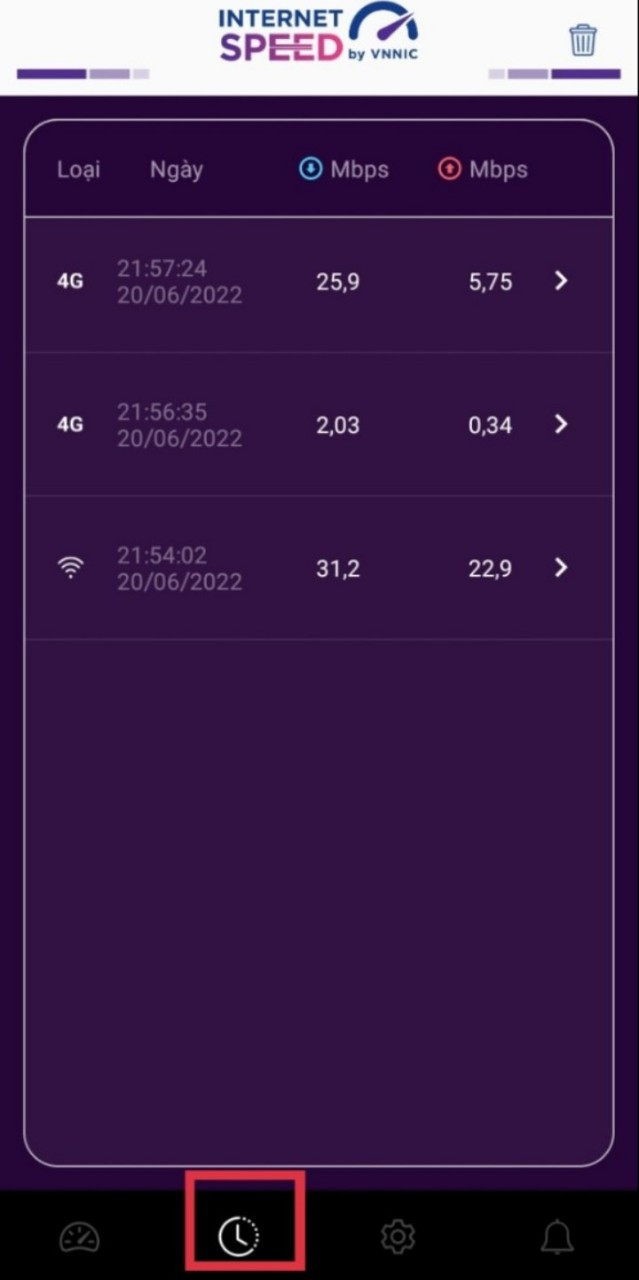
<p>Người dùng vào phần lịch sử đo -&gt; vào Menu lịch sử đo, ứng dụng cho phép xem lại lịch sử mọi quá trình đo tốc độ từ khi bắt đầu sử dụng.</p>

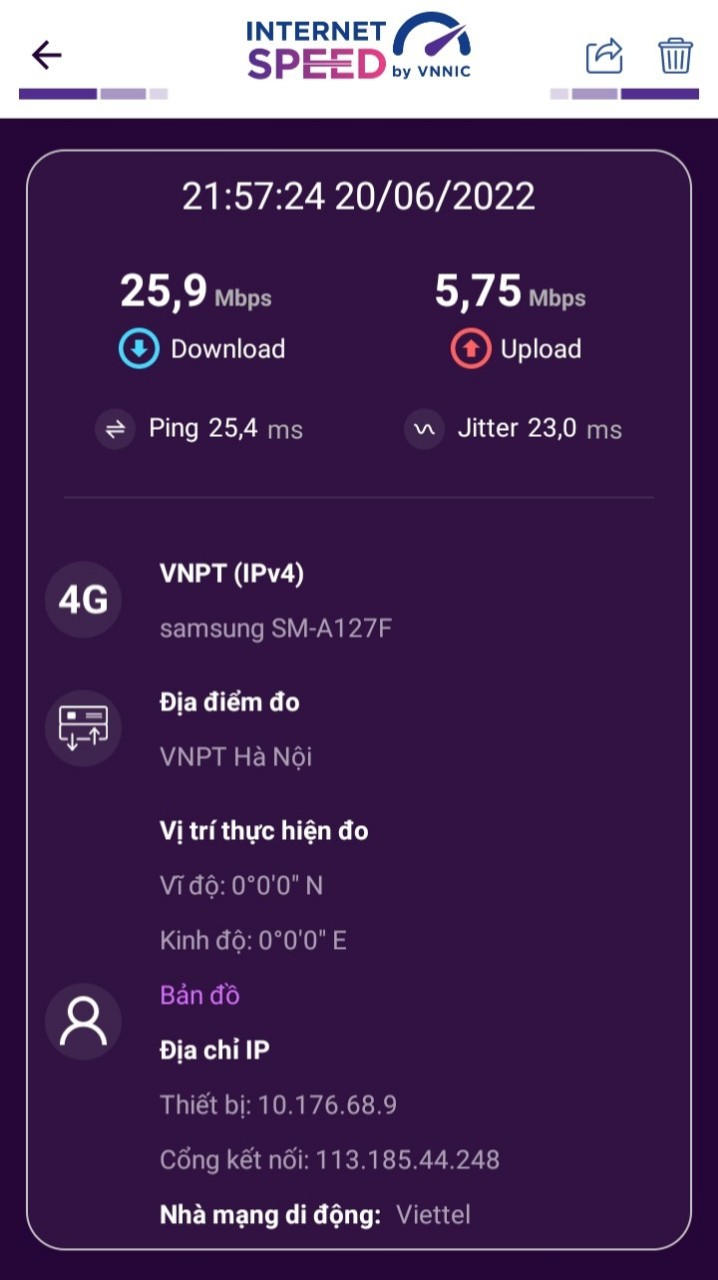
<p>Click vào kết quả để xem chi tiết các thông số như: tốc độ download, upload, độ trễ, nhà mạng, địa chỉ IP, vị trí thực hiện đo,...</p>

<p>Sau khi xem chi tiết các kết quả đo, người dùng có thể chia sẻ kết quả đó tương tự như sau khi thực hiện đo&nbsp;xong</p>

<p><img alt="" height="1280" src="https://www.ttythuyentanlac.vn/uploads/news/2024_06/image-20240618104952-11.png" width="639" /><img alt="" height="1280" src="https://www.ttythuyentanlac.vn/uploads/news/2024_06/image-20240618104952-12.png" width="718" /></p>

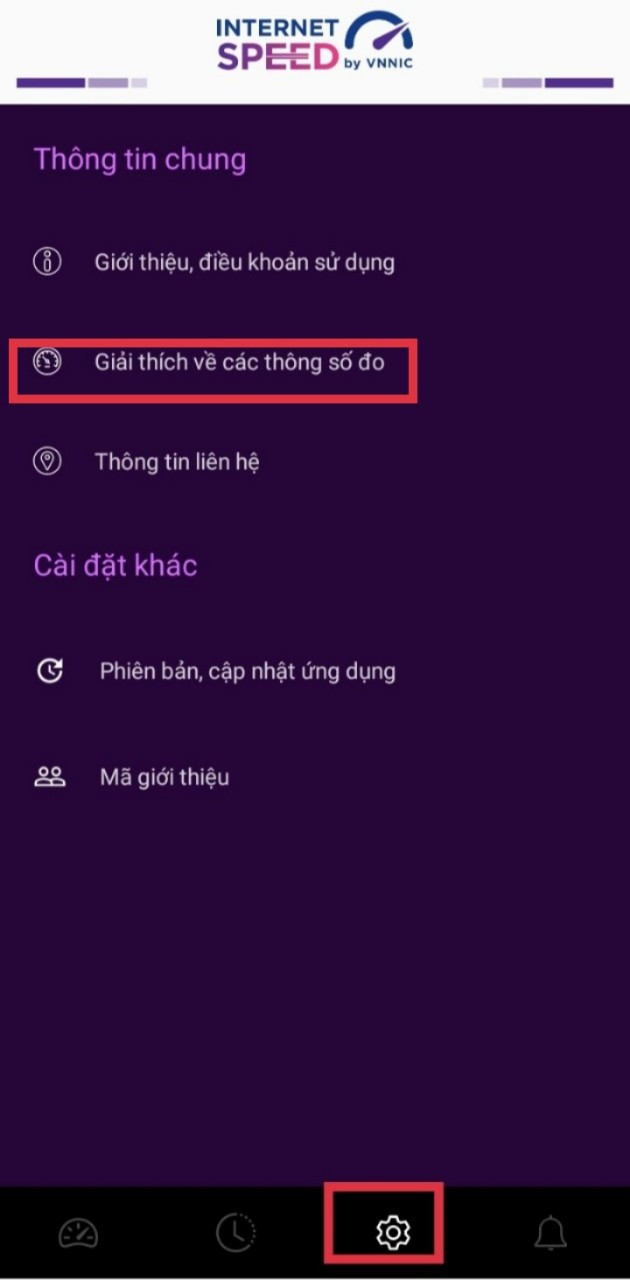
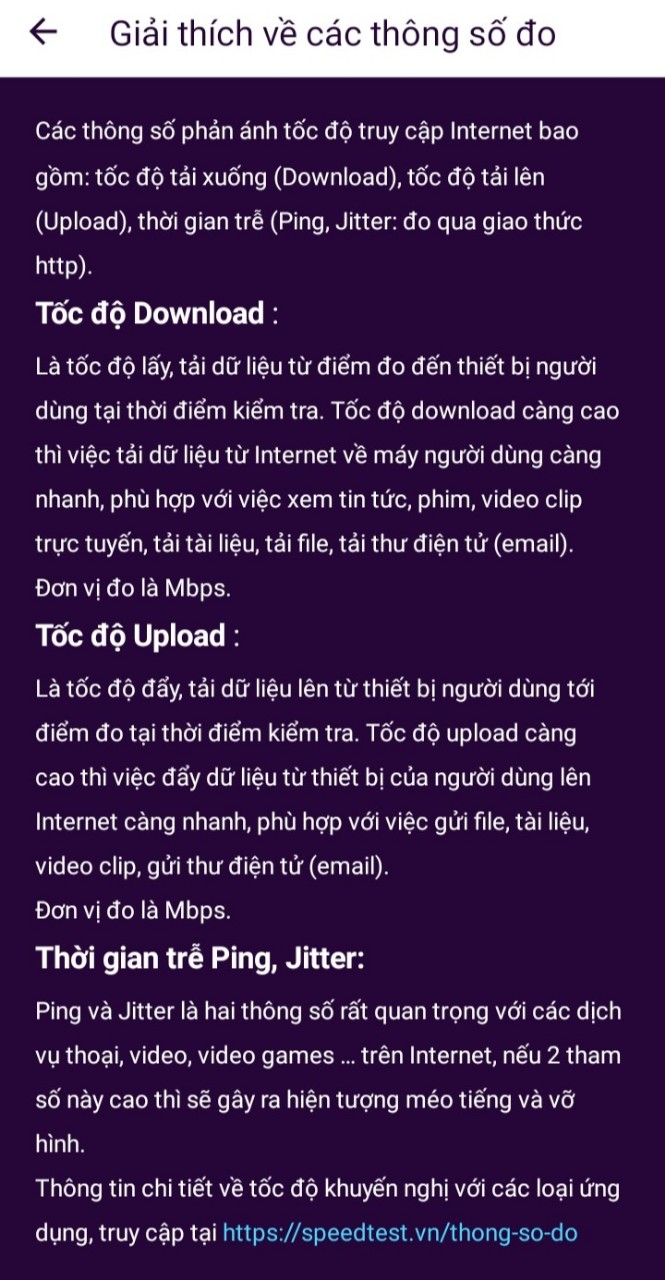
<p>Phần Thông tin chung, người dùng có thể xem giới thiệu, điều khoản sử dụng, giải thích các thông số đo, phiên bản cập nhật ứng dụng…</p>

<p><img alt="" height="1280" src="https://www.ttythuyentanlac.vn/uploads/news/2024_06/image-20240618104952-13.png" width="630" /><img alt="" height="1280" src="https://www.ttythuyentanlac.vn/uploads/news/2024_06/image-20240618104952-14.png" width="665" /></p>

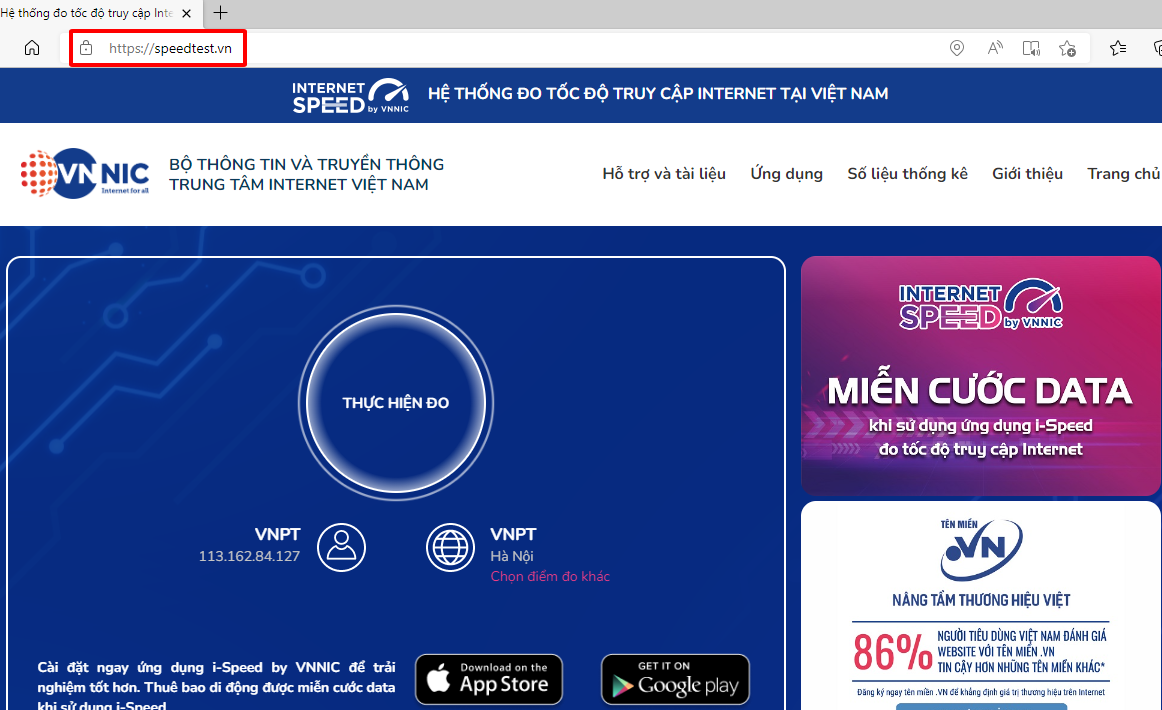
<p>2. Thực hiện đo kiểm trực tiếp tại website</p>

<p>Bước 1: Người dùng sử dụng máy tính truy cập vào địa chỉ<a href="https://speedtest.vn/" target="_blank">&nbsp;</a><a href="https://speedtest.vn/" target="_blank">https://speedtest.vn/</a><a href="https://speedtest.vn/" target="_blank">&nbsp;</a>&nbsp;</p>

<p><img alt="" height="710" src="https://www.ttythuyentanlac.vn/uploads/news/2024_06/image-20240618104952-15.png" width="1162" /></p>

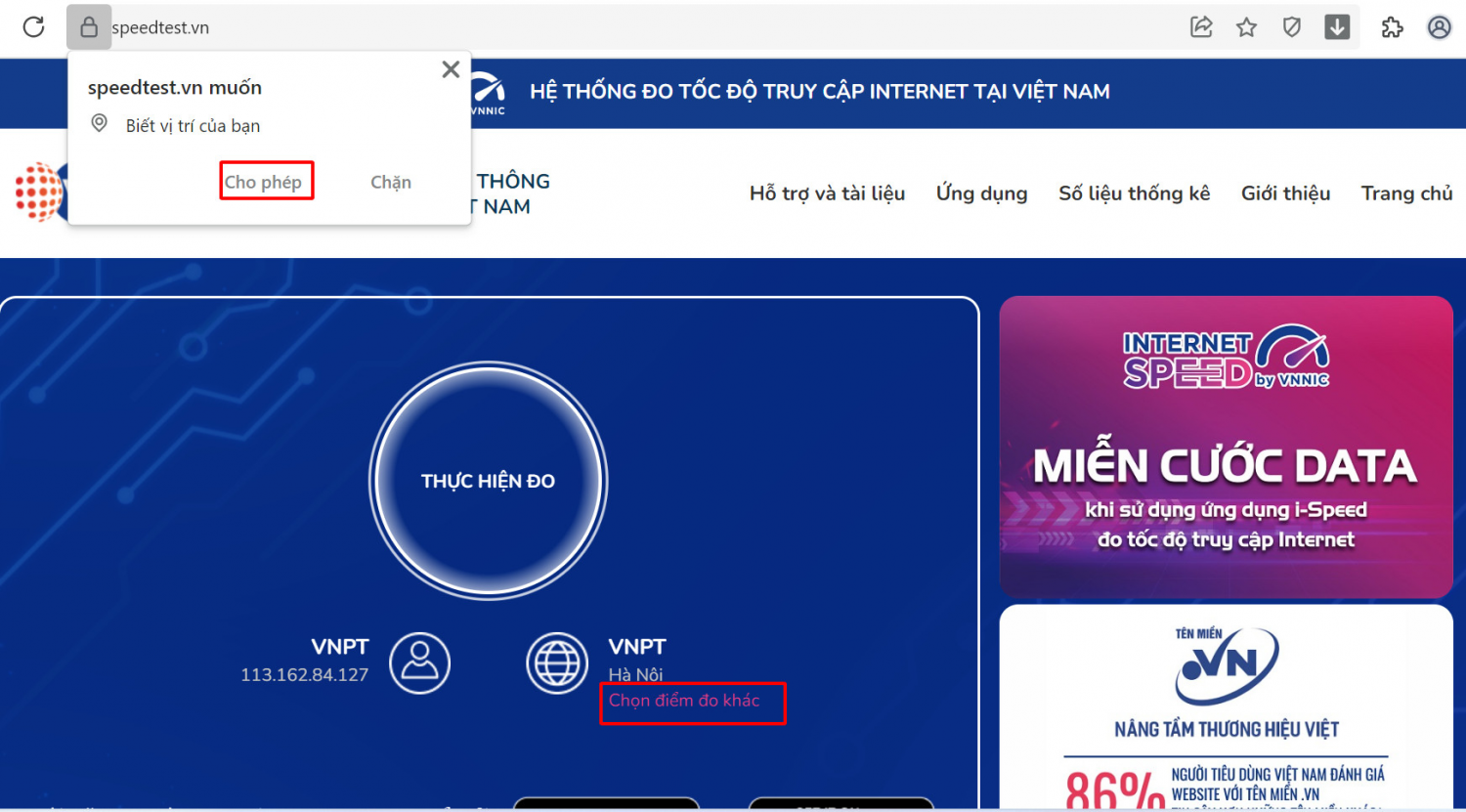
<p>Bước 2:</p>

<ul>
	<li>Cho phép quyền truy cập vị trí của website.</li>
	<li>Chọn “Chọn điểm đo khác”: Chọn server điểm đo của hệ thống; lựa chọn điểm đo gần với nhất để có kết quả đo chính xác nhất -&gt; Chọn “THỰC HIỆN ĐO” để bắt đầu.</li>
</ul>

<p><img alt="" height="966" src="https://www.ttythuyentanlac.vn/uploads/news/2024_06/image-20240618104952-16.png" width="1744" /></p>

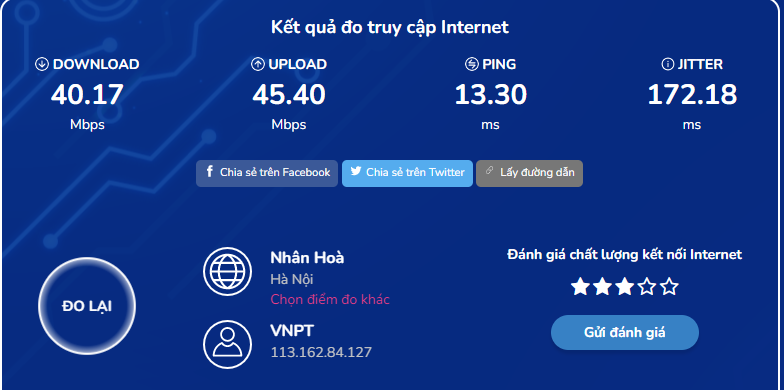
<p>Kết quả đo:</p>

<p><img alt="" height="390" src="https://www.ttythuyentanlac.vn/uploads/news/2024_06/image-20240618104952-17.png" width="784" /></p>

<p>Các thông số đo</p>

<p>Các thông số về tốc độ truy cập Internet bao gồm tốc độ tải xuống (Download), tốc độ tải lên (Upload), độ trễ (Ping. Jitter)</p>

<ul>
	<li>Tốc độ Download: Là tốc độ lấy, tải dữ liệu từ điểm đo đến thiết bị người dùng tại thời điểm kiểm tra. Tốc độ download càng cao thì việc tải dữ liệu từ Internet về máy người dùng càng nhanh, phù hợp với việc xem tin tức, phim video dip trực tuyến, tải tài liệu, tải file tải thư điện tử (email); Đơn vị đo là Mbps.</li>
	<li>&nbsp;Tốc độ Upload: Là tốc độ đẩy, tải dữ liệu lên từ thiết bị người dùng tới điểm đo tại thời điểm kiểm tra. Tốc độ upload càng cao thì việc đẩy dữ liệu từ thiết bị của người dùng lên internet càng nhanh, phù hợp với việc gửi file, tài liệu, video clip, gửi thư dien tu (email), live stream… ; Đơn vị đo là Mbps.</li>
	<li>Thời gian trễ Ping, Jitter: Ping và Jitter là hai thông số rất quan trọng với các dịch vụ thoại, video, video games... trên internet, nếu hai tham số này cao thì sẽ gây ra hiện tượng méo tiếng và vỡ hình. (i-Speed thực hiện ping qua giao thức https); Đơn vị đo là ms.</li>
</ul>

<p>Khi sử dụng ứng dụng i-Speed trên thiết bị di động ngoài các thông số và tốc độ truy cập internet trên, người dùng còn được biết thêm các kết quả:</p>

<p>- Loại kết nối (WH3G/4G/5G)</p>

<p>- Giao thức kết nối internet với</p>

<p>- Nhà cung cấp dịch vụ.</p>

<p>Người dùng có thể tham khảo kết quả đo để so sánh chất lượng dịch vụ thực tế với hợp đồng cung cấp dịch vụ của doanh nghiệp, từ đó có thể có các yêu cầu phù hợp với đơn vị cung cấp dịch vụ để cải thiện chất lượng internet./.</p>
		</div>
	</div>
	<div id="footer" class="clearfix">
		<div id="url">
			<strong>URL của bản tin này: </strong><a href="https://www.ttythuyentanlac.vn/tin-hoat-dong/huong-dan-cai-dat-su-dung-ung-dung-i-speed-244.html" title="HƯỚNG DẪN CÀI ĐẶT, SỬ DỤNG ỨNG DỤNG i-SPEED">https://www.ttythuyentanlac.vn/tin-hoat-dong/huong-dan-cai-dat-su-dung-ung-dung-i-speed-244.html</a>

		</div>
		<div class="clear"></div>
		<div class="copyright">
			&copy; TRUNG TÂM Y TẾ KHU VỰC TÂN LẠC
		</div>
		<div id="contact">
			<a href="mailto:hieusythb@gmail.com">hieusythb@gmail.com</a>
		</div>
	</div>
</div>
        <div id="timeoutsess" class="chromeframe">
            Bạn đã không sử dụng Site, <a onclick="timeoutsesscancel();" href="https://www.ttythuyentanlac.vn/#">Bấm vào đây để duy trì trạng thái đăng nhập</a>. Thời gian chờ: <span id="secField"> 60 </span> giây
        </div>
        <div id="openidResult" class="nv-alert" style="display:none"></div>
        <div id="openidBt" data-result="" data-redirect=""></div>
<script src="https://www.ttythuyentanlac.vn/assets/js/jquery/jquery.min.js"></script>
<script>var nv_base_siteurl="/",nv_lang_data="vi",nv_lang_interface="vi",nv_name_variable="nv",nv_fc_variable="op",nv_lang_variable="language",nv_module_name="news",nv_func_name="savefile",nv_is_user=0, nv_my_ofs=-4,nv_my_abbr="EDT",nv_cookie_prefix="nv4",nv_check_pass_mstime=1738000,nv_area_admin=0,nv_safemode=0,theme_responsive=1,nv_is_recaptcha=0;</script>
<script src="https://www.ttythuyentanlac.vn/assets/js/language/vi.js"></script>
<script src="https://www.ttythuyentanlac.vn/assets/js/global.js"></script>
<script src="https://www.ttythuyentanlac.vn/themes/default/js/news.js"></script>
<script src="https://www.ttythuyentanlac.vn/assets/js/jquery/jquery.cookie.js"></script>
<script src="https://www.ttythuyentanlac.vn/themes/egov/js/main.js"></script>
<script src="https://www.ttythuyentanlac.vn/themes/egov/js/custom.js"></script>
<script src="https://www.ttythuyentanlac.vn/themes/egov/js/bootstrap.min.js"></script>
</body>
</html>